

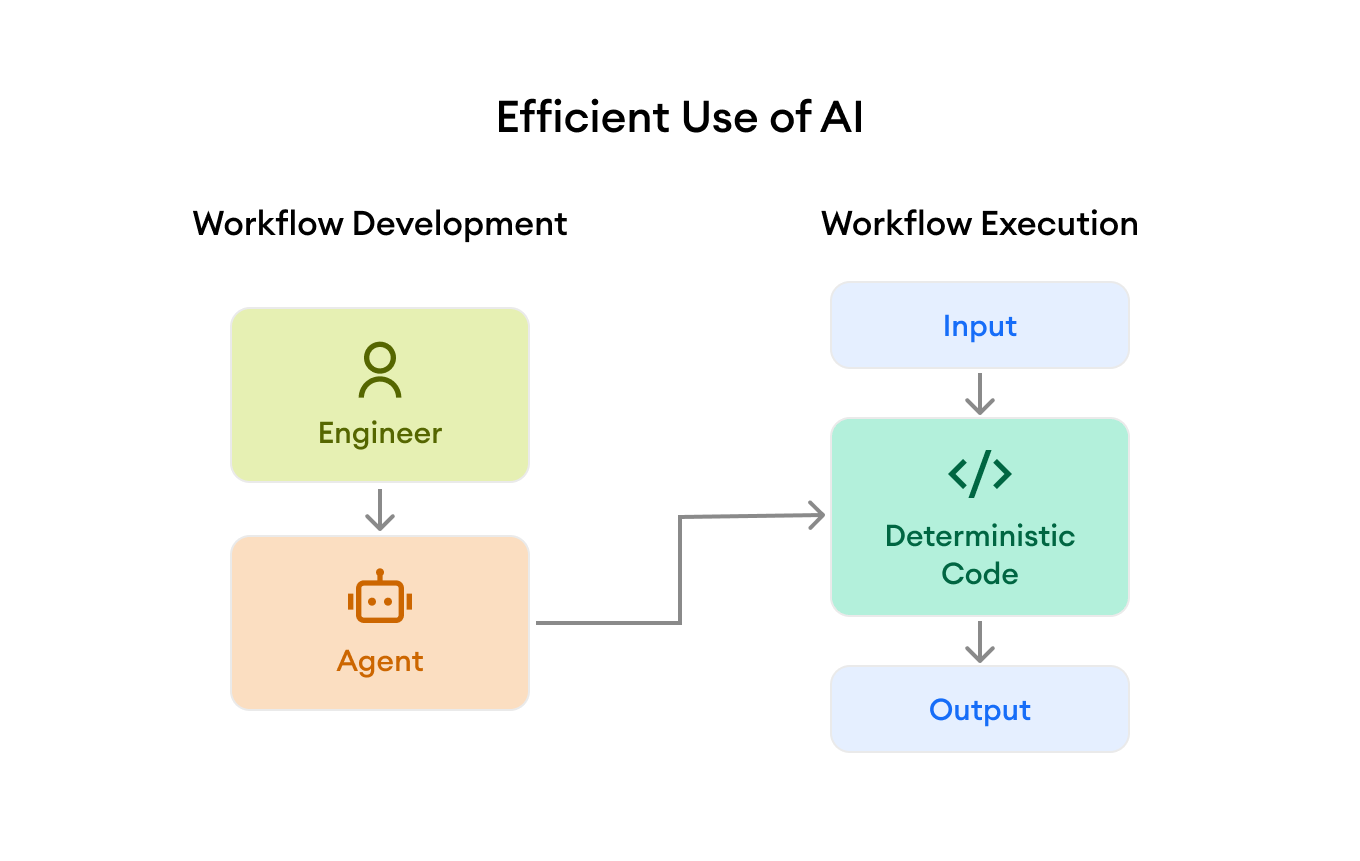
The biggest misconception about agent productivity is that it’s about maximizing agent autonomy.
The idea is that AI adoption should focus on having agents work longer with less help, measuring progress by the quantity and quality of agent output relative to human involvement. More skills, more instruction files, more context.
This is like saying the key to building more software prior to AI was just hiring as many good engineers as possible, then spending all your budget on training without investing in DevOps.
The issue is that both humans and LLMs are expensive and non-deterministic. Just throwing people or LLMs at a problem leads to massive inefficiency and ultimately poor quality.
The key to agent productivity is the same as the key to human productivity: improve efficiency by simplifying and automating workflows with deterministic processes.
Throwing LLMs at a problem is actually more dangerous because of one fundamental difference: people think for themselves. If you hire good engineers, they tend to use their judgment to do the right thing.
Model vendors have a conflict of interest. They want you to use LLMs as much as possible. Vendor agent harnesses like Claude Code are great for producing deterministic code to automate workflows, but are slower, more expensive, and less reliable than conventional code at executing workflow steps that can be automated.
Many companies are patching over this lack of reliability with even more non-deterministic LLM workflow steps in the name of being “AI native.” Much like organizations that missed the boat on DevOps, those who focus on autonomy without paying attention to agent efficiency are going to be in for a rude awakening.
This article demonstrates by example how we built Thoreau at minware, our AI pipeline for generating product documentation (you can see the end result here). Thoreau follows the principle of efficiency first, using agents to develop a workflow that minimizes the role of LLMs in the workflow itself, resulting in higher quality and lower costs.
Principle #1: Information movement and transformation should be automated
The first guiding principle of our documentation workflow is that information should have a single home. If it is needed in another place or format, the movement and transformation should be done by deterministic code that automates the process.
Our product at minware has a variety of metrics and reports about developer productivity. Names and descriptions of those metrics are represented as structured data in the application, along with reports that have text describing how to use and interpret those metrics.
The product documentation on minware.com has its own content management system in a separate repository.
The autonomy-first approach
One trap companies fall into even without AI is to have a person use the product and then write documentation in an independent system, moving and transforming information manually. (“Hey engineer: please type pages of documentation into the CMS.”)
We didn’t want to do this with Thoreau. It would have been easy to create skills that told Claude Code to fire up a browser, go through the reports, and write out documentation markdown files describing all the metrics. (“Hey Claude: please produce pages of documentation and put it in the CMS.”)
This autonomy-first approach would have been faster to build as well. However, every word of documentation would be liable to change with each future iteration and be subject to potential hallucinations (just like the manual workflow is subject to human error), requiring further review.
Of course, we could have doubled down on agent autonomy and created even more skills and steps to verify the output, burning tokens along the way.
This would be in effect automating an inefficient human process with an inefficient AI process.
The efficiency-first approach
Instead, we told Claude Code to build a series of automated scripts to extract and transform information from its canonical source in our application into the form needed for generating documentation.
Because these scripts were simple, for internal use with known inputs, and we could fully validate the final output (static documentation pages), we didn’t have to read the code like we would for customer-facing workflows. We had Claude write unit tests of course, but development was very fast.
The first task in this process fetches all of the report and metric data from our API and saves it to a JSON file, which is not checked into version control.
Then, we gave Claude Code instructions for writing a script to transform raw API data, organizing report contents based on their menu structure and creating a list of metrics associated with each report.
The output contains the relevant data from our application arranged roughly how it will appear in the final documentation, and dropping irrelevant fields.
Principle #2: Automate in small steps
We built the movement and transformation scripts using Claude Code by only looking at the script output and not having to read the code.
This wouldn’t have been feasible by just handing Claude the API and desired output format.
Instead, we broke down the process into several distinct scripts and validated the output at each step.
The trap people often fall into with agents (and, to be fair, with engineers as well) is trying to do too much at once. This raises the complexity above the level where you can efficiently get to the right result just by providing feedback on the output.
First, we focused only on extracting the raw API data and writing it directly to a file. Then, we did basic preprocessing to filter the raw data down to only what was needed. We then linked and rearranged records so that the raw fields for each metric and report were adjacent to one another. Finally, we applied transformation logic to produce the final fields in the correct format for output.
At each step, Claude made some mistakes that we told it to correct. If we had tried to do it all at once, it would have been a lot more difficult for us and for Claude to isolate and fix each of the errors.
Principle #3: Isolate human context from agent-generated code
Working with real data, you inevitably encounter things that are incorrect or inconsistent. For us, certain metric descriptions were written differently from the others, and certain charts were set up in a way that would have led to repetitive or nonsensical documentation.
To address this issue, we had Claude flag everything that didn’t fit the expected format in a list of exceptions generated by the automated script. This caught things like two charts with the same title using different metrics on different reports, or orphan metrics that didn’t show up on any report.
Resolving each of these exceptions required human instructions to say how to handle the issue.
The wrong way to do this is to tell Claude Code how to deal with issues one at a time by embedding data-dependent logic inside of the code that it generated.
If you mix AI-generated code and human context together in this way, it makes maintenance a nightmare because you have to sift through thousands of lines to understand the embedded human context.
Instead, we created a separate notes.yml file to hold all of the human-provided context and told Claude to have the scripts read these notes when processing the data. This file also served as a concise to-do list for cleaning up the source data at a later time. The notes file is read and reviewed by a person, but the scripts that used it are not.
Principle #4: You usually don’t need an LLM
Once we extracted and organized all of the text fields from their source in our application, there were a series of transformations that involved manipulating text.
For example, some metrics were written like “Average XYZ” while others were “XYZ (Avg.)”. We also had to combine different fields like “Metric X by Dimension Y” where the metric and dimension names were in separate fields.
Most text transformations can be achieved with regular expressions. It’s worth it to ask AI to implement the transformation with conventional code first, because there may be text processing methods you aren’t aware of that are deterministic and cheaper than using an LLM.
As a general guideline, if the transformations you’re doing are purely syntactic, then you probably don’t need an LLM. To be concrete: it is more effective to have an LLM generate a pipeline that deterministically transforms text than it is to provide an LLM with unstructured inputs, describe your desired outputs, and ask for the final output to be written to disk. Even if you have a skill that guides the LLM, the deterministic process will be faster, easier to maintain, and 100% correct for behavior that is covered by automated tests.
LLMs only come into play when you need to embed a judgment that depends on the meaning of words or the broader context.
Doing all the transformations you can with deterministic code first lets you focus the LLM where it was really needed.
Principle #5: Isolate and constrain LLM steps
This brings us to where we really needed to use an LLM. Some of our reports already had human-written summaries of their purpose and what the report contained. Others did not.
We also have shorter length constraints in our documentation pages than in the application, so some of the existing text needed to be shortened intelligently.
There was also certain information that didn’t exist in our application, like an appropriate magnitude to show for demo charts of things like commit or story point counts.
When it came time to use an LLM, we first had the automated script extract a minimal list of the items that needed attention.
We also instructed Claude to have the script insert other information that would be relevant context for LLM processing into this to-do list. This included the titles of all the charts, names of the reports, and text content on the reports other than the report description.
Then, we gave Claude specific instructions to create an llm.yml file that just had the IDs of the items and the LLM-generated data for each field. This resulted in a concise list that was easy to review, which we checked into version control.
For the things that were wrong and needed extra context, we added that to the human notes.yml file and asked Claude to re-run the LLM generation step using that context.
While we used Claude Code for this LLM step (by creating a skill to have it run the pre-LLM script, update llm.yml, then run the post-LLM script), you’d want to do it with raw LLM calls in a pipeline with more data to control the exact LLM input, which would more the results more deterministic and reduce costs.
After running the LLM generation step, the final piece was to have an automated script combine the LLM output with everything else and push it to the final documentation markdown output format, which you can see at this link.
The whole pipeline runs the scripts in a few seconds and the LLM processing in several seconds more. The diff is easy to review because we can see which changes come from an LLM and which are just copying upstream changes that have already been reviewed.
Putting agent efficiency into practice
It’s one thing to understand the principles of efficient AI automation. Managing an organization to apply these principles at scale is a far greater challenge. Here are a few practical things you can do to set your team on the right path.
Document and enforce AI workflow automation guidelines
The first step to implementing agent efficiency is to establish a shared written document with technical leaders that outlines how engineers should automate workflows using AI.
This should include things like how to structure files (i.e., separating human notes from agent code and LLM processing outputs), what types of processing should happen with deterministic code, which artifacts need human review, etc.
It’s also helpful to specify when workflows should have more or less stringent guidelines based on how frequently they run, how critical it is to have correct output, and maintenance expectations. This ensures the guidelines don’t get in the way of engineers applying common sense.
The guidelines also should encourage the initial creation of text-based skills for repeated AI tasks, even if they should be made more efficient later. Otherwise, people may use agents directly without creating skills, which makes deterministic automation harder to see and manage.
Finally, for guidelines to be effective, it’s essential that technical leaders understand them, buy into them, and have ample time to review the work of less experienced engineers to ensure that it conforms.
Keep an inventory of your AI workflows
With the push toward AI adoption and the power of agents, people are creating more automated workflows than ever, including for one-off personal tasks.
Given the explosion of AI workflows, it’s impractical to optimize all of them. This is why an inventory is so valuable: it helps you identify which workflows are the most important and prioritize their efficiency.
The best way right now to gain visibility into AI workflows is to heavily encourage the consolidation of repetitive AI tasks into skills, MCPs, and tools, as mentioned in the previous section.
With common named capabilities in place, you can look at usage traces from your AI tools to see how much each skill/MCP/tool is being used, how long it takes, its success rate, and its token cost.
The major coding agents (Claude Code, Codex, Gemini CLI, OpenCode etc…) emit OpenTelemetry data which is the most complete source for this type of information. Other tools, like Cursor, have enterprise usage APIs that include some of this data as well.
It’s also helpful if you link this data to commits, pull requests, and tickets by ingesting and joining it with data from your version control and project management system. (We’ve built minware to do this for you if you’re not keen on using your tokens to manage a data pipeline.)
All together, this gives you full observability over each AI workflow, showing which types of tickets, projects, repositories, and tasks use it. Understanding the impact of each workflow on higher-level outcomes lets you effectively manage agent efficiency across the organization.
Agent efficiency is the future
Agents are still a very new technology. Most organizations are closer to the start of their transformation than to the end.
The mass euphoria around AI has shone a spotlight on autonomy, with free-flowing budgets and a race to use AI for everything.
Autonomy is not bad per se. Having LLMs do tasks that humans used to do may still be a big win.
However, many of the success stories I see look like automating inefficient human processes.
LLMs may be cheaper than people, but even if their cost drops to zero, they are still inescapably non-deterministic.
The agent efficiency wave is coming. Unless you get ahead of it, you risk landing back where you started before adopting AI, just with a bigger monthly bill.